When your AT&T phone shows full bars but won't load a webpage, or your picture messages refuse to send, the problem is usually the APN. APN stands for Access Point Name, and it is the profile your device uses to reach AT&T's network for mobile data and MMS.
Most phones pull the correct AT&T profile automatically the moment you insert a SIM or activate an eSIM. You only need to touch these settings if you brought an unlocked phone, switched carriers, or data and MMS stopped working after an update.
This guide is built around the symptom and the device you own, so you can jump straight to the right values. If you want side by side settings for Verizon, T-Mobile and other carriers, see our APN settings for AT&T, Verizon, T-Mobile and other US carriers.
What an APN Actually Controls
The APN tells your phone which gateway to use for data and which server to use for picture and group messages. Get the data fields wrong and the internet breaks. Get the MMS fields wrong and texts work but photos fail.
AT&T uses different APN names depending on how new your phone is, which is why one set of values does not fit every device. A few year old LTE phone, a current 5G phone, a tablet and a smartwatch each expect a different profile.
The good news is that the supporting values are shared. Across the main AT&T phone profiles the carrier code is the same, so once you know your device category you mainly need to swap the APN name and a couple of fields.
AT&T Network Values You Will Reuse
These values stay the same no matter which device you are setting up, so keep them handy. They are the standard AT&T network and MMS values used by current phones.
MMSC > http://mmsc.mobile.att.net
MMS Proxy > proxy.mobile.att.net
MMS Port > 80
MCC > 310
MNC > 410
Leave Username, Password, Authentication Type and any field not listed in each section blank or set to None. Adding values AT&T does not ask for is one of the most common reasons a profile fails.
Reach APN Settings on Android
The menu wording shifts a little between Samsung, Google and other brands, but the destination is the same. The fastest route on any Android phone is to open Settings and search for Access Point Names.
Settings > Connections or Network & Internet > Mobile Networks or SIMs > Access Point Names
Tap the plus icon or the menu to add a new APN, enter the values for your device below, then save it from the menu and select it. If an old or wrong AT&T profile is already there, delete it first so your phone does not fall back to it.
Reach APN Settings on iPhone
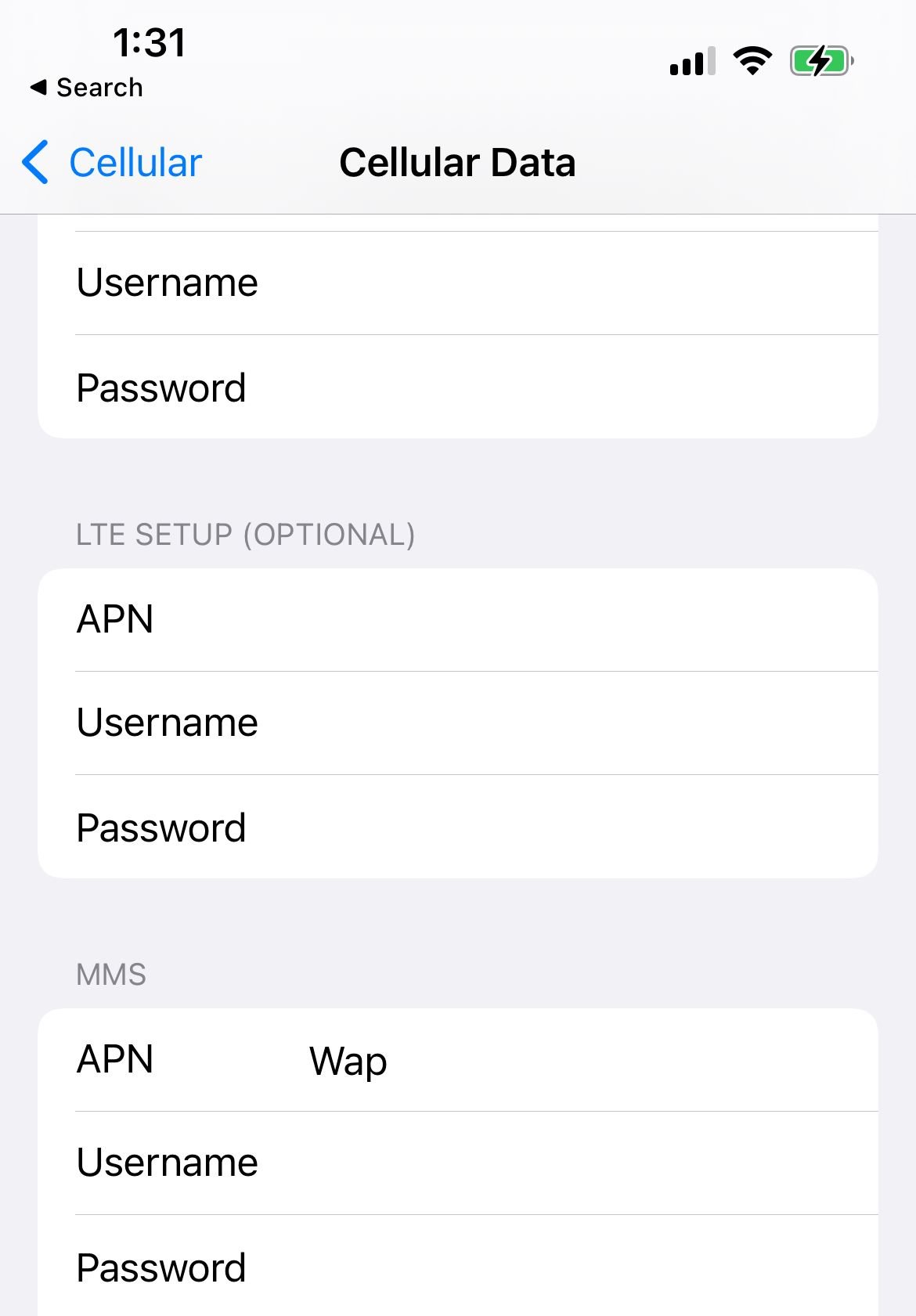
On iPhone the editor is called Cellular Data Network, and it only appears when AT&T allows manual edits. On many modern iPhones the profile is carrier managed and the menu is hidden, which is normal.
Settings > Cellular > Cellular Data Network
If you do not see Cellular Data Network, AT&T is managing the profile for you and you should not force it. The reliable fix on iPhone is to reset the network settings, covered further down, rather than typing values by hand.
When the menu is available, you fill in the Cellular Data section and the MMS section separately using the values for iPhone below. Remember that an iOS update can reset any manual changes, so you may need to enter them again.
Android Phone Settings for LTE
Use this profile for the majority of AT&T Android phones, including most models that are a few years old. The APN name here is the workhorse profile for standard data and picture messaging.
- Name: AT&T NXTGENPHONE
- APN: NXTGENPHONE
- MMSC: http://mmsc.mobile.att.net
- MMS Proxy: proxy.mobile.att.net
- MMS Port: 80
- MCC: 310
- MNC: 410
- APN Type: default,mms,supl,hipri
- APN Protocol: IPv4/IPv6
If data works but photos will not send, double check the three MMS fields above for a stray space or a missing http prefix. Those typos are the single most common cause of failed picture messages.
Android Phone Settings for 5G
Newer 5G capable Android phones on AT&T expect a different APN name. If NXTGENPHONE connects but feels slow or drops to LTE on a 5G phone, switch to this profile.
- Name: AT&T 5G
- APN: ENHANCEDPHONE
- MMSC: http://mmsc.mobile.att.net
- MMS Proxy: proxy.mobile.att.net
- MMS Port: 80
- MCC: 310
- MNC: 410
- APN Type: default,mms,supl,hipri
- APN Protocol: IPv4
The most current 5G standalone phones may instead use the NRPHONE profile with the same MCC and MNC, an APN type of default,mms,supl,hipri,fota, and the MMS fields left blank. Try ENHANCEDPHONE first and only move to NRPHONE if your phone is a recent 5G standalone model that still has no data.
iPhone Settings
Use these values only if Cellular Data Network is visible on your iPhone. Enter the data fields in the Cellular Data section and the MMS fields in the MMS section.
- Cellular Data APN: NXTGENPHONE
- Username and Password: leave blank
- MMS APN: NXTGENPHONE
- MMSC: http://mmsc.mobile.att.net
- MMS Proxy: proxy.mobile.att.net
On a 5G iPhone, ENHANCEDPHONE is the matching name if NXTGENPHONE does not give you a full data connection. If the fields keep reverting, AT&T is managing the profile and the network settings reset below is the correct path.
Tablet and Hotspot Settings
AT&T branded and BYOD tablets, including iPad and Android tablets, use a broadband profile rather than a phone profile. The same applies to many mobile hotspot devices.
- Name: AT&T Broadband
- APN: broadband
- MCC: 310
- MNC: 410
- APN Type: default,mms,supl,hipri,fota
- APN Protocol: IPv4/IPv6
Tablets rarely need MMS, so you can leave the MMS fields blank. On iPad the editor is the same Cellular Data Network screen you use on iPhone.
Smartwatch and Basic Phone Settings
Cellular smartwatches such as Apple Watch and Samsung Galaxy Watch do not use a hand typed APN on AT&T. They are activated through NumberSync, which you set up in the companion Watch app on your paired iPhone or Android phone rather than on the watch itself.
On a paired watch, open the Watch app, find the cellular or NumberSync setup option, and follow the prompts so the line provisions automatically. If the watch has no data after setup, the fix is to redo NumberSync or confirm the line in your AT&T account, not to enter APN values.
Basic feature phones that take an AT&T SIM generally pull their data profile on their own. If such a phone has data but cannot send pictures, add the shared MMSC, MMS proxy and MMS port values listed earlier and leave everything else blank.
When New Settings Still Will Not Connect
If you entered everything correctly and data or MMS still fails, work through these steps before calling support. Each one clears a different common cause.
- Remove old profiles. Delete any leftover AT&T or previous carrier APN so the phone cannot use it instead.
- Check capitalization and spaces. APN names like NXTGENPHONE are case sensitive on some devices, and a trailing space breaks the field.
- Restart the device. A reboot forces the phone to register on the network with the new profile.
- Confirm the SIM or eSIM is active. A profile cannot help if the line is not provisioned, so verify activation in your AT&T account.
On iPhone, the cleanest reset is to wipe the network configuration and let AT&T reapply its own profile. This fixes most cases where the fields are greyed out or keep reverting.
Settings > General > Transfer or Reset iPhone > Reset > Reset Network Settings
On Android, look for a similar option under Settings then System or General management, usually named Reset network settings or Reset Wi-Fi, mobile and Bluetooth. After any reset, reconnect to Wi-Fi and let the phone re-register before testing data.
Frequently Asked Questions
Why does my AT&T phone have data but cannot send pictures?
That pattern almost always means the MMS fields are wrong while the data fields are fine. Re-enter the MMSC as http://mmsc.mobile.att.net, the MMS proxy as proxy.mobile.att.net and the MMS port as 80, and remove any extra spaces.
Which AT&T APN should I use, NXTGENPHONE or ENHANCEDPHONE?
Use NXTGENPHONE for most LTE phones and ENHANCEDPHONE for 5G capable phones. If one does not connect, switch to the other, since AT&T moves devices between these profiles as networks evolve.
Why is there no Cellular Data Network option on my iPhone?
AT&T is managing your APN profile, so Apple hides the editor on purpose. You do not need to add anything manually, and a network settings reset will reapply the correct profile if data is broken.
Do I need to re-enter my APN after an update?
You might. Apple notes that an iOS update can reset manual APN changes to the carrier default, and the same can happen on Android, so check these settings again if data or MMS stops working right after an update.
Are these AT&T settings the same for prepaid and MVNO lines?
AT&T postpaid and AT&T Prepaid use these values, but resellers that run on the AT&T network often use their own APN names. For those brands, check our carrier guides for the specific provider rather than using NXTGENPHONE.
First published October 4, 2025. Last updated June 4, 2026.